
Abstract
This vignette shows how to calculate and visualize isochrones in R using ther5r package.
1. Introduction
An isochrone map shows how far one can travel from a given place
within a certain amount of time. In other other words, it shows all the
areas reachable from that place within a maximum travel time. This
vignette shows how to calculate and visualize isochrones in R using the
r5r
package using a reproducible example. In this example, we will be
using a sample data set for the city of Porto Alegre (Brazil) included
in r5r. Our aim here is to calculate several isochrones
departing from the central bus station given different travel time
thresholds.
The r5r::isochrone() function allows you to build both
polygon- and line-based isochrones. We will cover both approaches in
this vignette, where we will be calculating isochrones by public
transport from the central bus station in Porto Alegre.
Before we start, we need to increase Java memory + load a few
libraries, and to
build routable transport network.
Warning: If you want to calculate how many
opportunities (e.g. jobs, or schools or hospitals) are located inside
each isochrone, we strongly recommend you NOT to use the
isochrone() function. You will find much more efficient
ways to do this in the Accessibility
vignette.
2. Build routable transport network with
build_network()
Increase Java memory and load libraries
First, we need to increase the memory available to Java and load the packages used in this vignette. Please note we allocate RAM memory to Java before loading our libraries.
To build a routable transport network with r5r, the user
needs to call build_network() with the path to the
directory where OpenStreetMap and GTFS data are stored.
# system.file returns the directory with example data inside the r5r package
# set data path to directory containing your own data if not running this example
data_path <- system.file("extdata/poa", package = "r5r")

r5r_network <- build_network(data_path)
3. Calculating and visualizing isochrones
3.1 Polygon-based isochrones
The most common approach here is to create polygon-based isochrones.
To do this, you need to pass the arguments
polygon_output = TRUE and choose the zoom
level. The polygon-based isochrone in {r5r} are built on top of a
regular grid based on Web
Mercator pixels. The zoom level can be controlled with the
zoom parameter; higher zooms lead to more detailed
isochrones at the expense of computational time. The default is 10
(which uses cells of 153m at the Equator). In large networks, high zooms
may not be possible and will give an error.
With the code below, r5r determines the isochrones
considering the median travel time of multiple travel time estimates
calculated departing every minute over a 60-minute time window, between
2pm and 3pm.
# read all points in the city
points <- fread(file.path(data_path, "poa_hexgrid.csv"))

# subset point with the geolocation of the central bus station
central_bus_stn <- points[291,]

# isochrone intervals
time_intervals <- seq(0, 100, 10)

# routing inputs
mode <- c("WALK", "TRANSIT")
max_walk_time <- 30      # in minutes
time_window <- 60        # in minutes
departure_datetime <- as.POSIXct("13-05-2019 14:00:00",
                                 format = "%d-%m-%Y %H:%M:%S")

# calculate travel time matrix
iso1 <- r5r::isochrone(
  r5r_network,
  origins = central_bus_stn,
  mode = mode,
  polygon_output = TRUE,
  cutoffs = time_intervals,
  departure_datetime = departure_datetime,
  max_walk_time = max_walk_time,
  time_window = time_window,
  progress = FALSE,
  zoom = 10
  )
As you can see, the isochrone() functions works very
similarly to the travel_time_matrix() function. However,
instead of returning a table with travel time estimates, it returns a
POLYGON "sf" "data.frame" for each isochrone of each
origin when you set polygon_output = TRUE.
head(iso1)
#> Simple feature collection with 6 features and 3 fields
#> Geometry type: MULTIPOLYGON
#> Dimension:     XY
#> Bounding box:  xmin: -51.26701 ymin: -30.11365 xmax: -51.13243 ymax: -29.99003
#> Geodetic CRS:  WGS 84
#>                id isochrone percentile                       polygons
#> 1 89a90128a8fffff       100        p50 MULTIPOLYGON (((-51.14891 -...
#> 2 89a90128a8fffff        90        p50 MULTIPOLYGON (((-51.16493 -...
#> 3 89a90128a8fffff        80        p50 MULTIPOLYGON (((-51.16814 -...
#> 4 89a90128a8fffff        70        p50 MULTIPOLYGON (((-51.17638 -...
#> 5 89a90128a8fffff        60        p50 MULTIPOLYGON (((-51.22444 -...
#> 6 89a90128a8fffff        50        p50 MULTIPOLYGON (((-51.22581 -...
Now it becomes super simple to visualize our isochrones on a map:
# extract OSM network
street_net <- street_network_to_sf(r5r_network)
main_roads <- subset(street_net$edges, street_class %like% 'PRIMARY|SECONDARY')
colors <- c('#ffe0a5','#ffcb69','#ffa600','#ff7c43','#f95d6a',
'#d45087','#a05195','#665191','#2f4b7c','#003f5c')
ggplot() +
geom_sf(data = iso1, aes(fill=factor(isochrone)), color = NA, alpha = .7) +
geom_sf(data = main_roads, color = "gray55", size=0.01, alpha = 0.2) +
geom_point(data = central_bus_stn, aes(x=lon, y=lat, color='Central bus\nstation')) +
scale_fill_manual(values = rev(colors) ) +
scale_color_manual(values=c('Central bus\nstation'='black')) +
labs(fill = "Travel time\n(in minutes)", color='') +
theme_minimal() +
theme(axis.title = element_blank())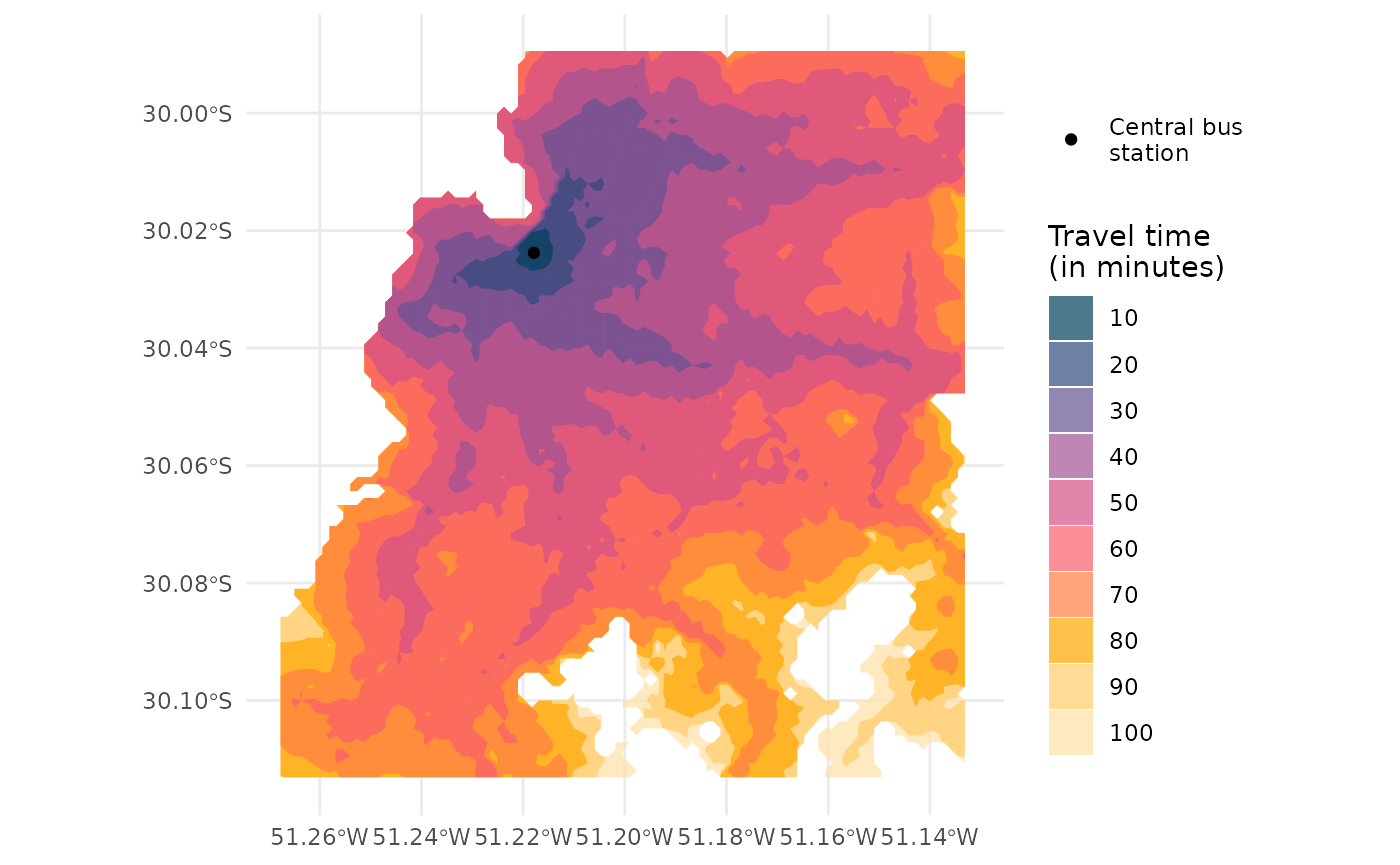 ## 3.2 Line-based isochrones
Alternatively, you can build line-based isochrones by simply passing
polygon_output = FALSE to the isochrone()
function. Note that you do not need the zoom parameter
here, and that the output is
LINESTRING "sf" "data.frame".
# calculate travel time matrix
iso2 <- r5r::isochrone(
  r5r_network,
  origins = central_bus_stn,
  mode = mode,
  polygon_output = FALSE,
  cutoffs = time_intervals,
  departure_datetime = departure_datetime,
  max_walk_time = max_walk_time,
  time_window = time_window,
  progress = FALSE
  )

head(iso2)
#> Simple feature collection with 6 features and 14 fields
#> Geometry type: LINESTRING
#> Dimension:     XY
#> Bounding box:  xmin: -51.20291 ymin: -30.10872 xmax: -51.1844 ymax: -30.09557
#> Geodetic CRS:  WGS 84
#>                id edge_index    osm_id isochrone travel_time_p50 from_vertex
#> 1 89a90128a8fffff      32820 289389686       100              98        7464
#> 2 89a90128a8fffff      32821 289389686       100              98       14753
#> 3 89a90128a8fffff      34254 326021940       100              98       15308
#> 4 89a90128a8fffff      34255 326021940       100              98       15309
#> 5 89a90128a8fffff      35888 337865739       100              98       15671
#> 6 89a90128a8fffff      35889 337865739       100              98       15690
#>   to_vertex street_class  length  walk   car car_speed bicycle bicycle_lts
#> 1     14753        OTHER 374.345  TRUE  TRUE    39.996    TRUE           2
#> 2      7464        OTHER 374.345  TRUE  TRUE    39.996    TRUE           2
#> 3     15309        OTHER 227.438  TRUE FALSE    40.248    TRUE           1
#> 4     15308        OTHER 227.438  TRUE FALSE    40.248    TRUE           1
#> 5     15690        OTHER  87.668 FALSE FALSE    40.248   FALSE           1
#> 6     15671        OTHER  87.668 FALSE FALSE    40.248   FALSE           1
#>                         geometry
#> 1 LINESTRING (-51.19973 -30.1...
#> 2 LINESTRING (-51.20291 -30.1...
#> 3 LINESTRING (-51.1844 -30.10...
#> 4 LINESTRING (-51.18581 -30.1...
#> 5 LINESTRING (-51.19704 -30.0...
#> 6 LINESTRING (-51.19686 -30.0...
Now it becomes super simple to visualize our isochrones on a map:
ggplot() +
  geom_sf(data = iso2, aes(color=factor(isochrone)), alpha = .7) +
  scale_color_manual(values = rev(colors) ) +
  geom_point(data = central_bus_stn, aes(x=lon, y=lat), color='black') +
  labs(color = "Travel time\n(in minutes)") +
  theme_minimal() +
  theme(axis.title = element_blank())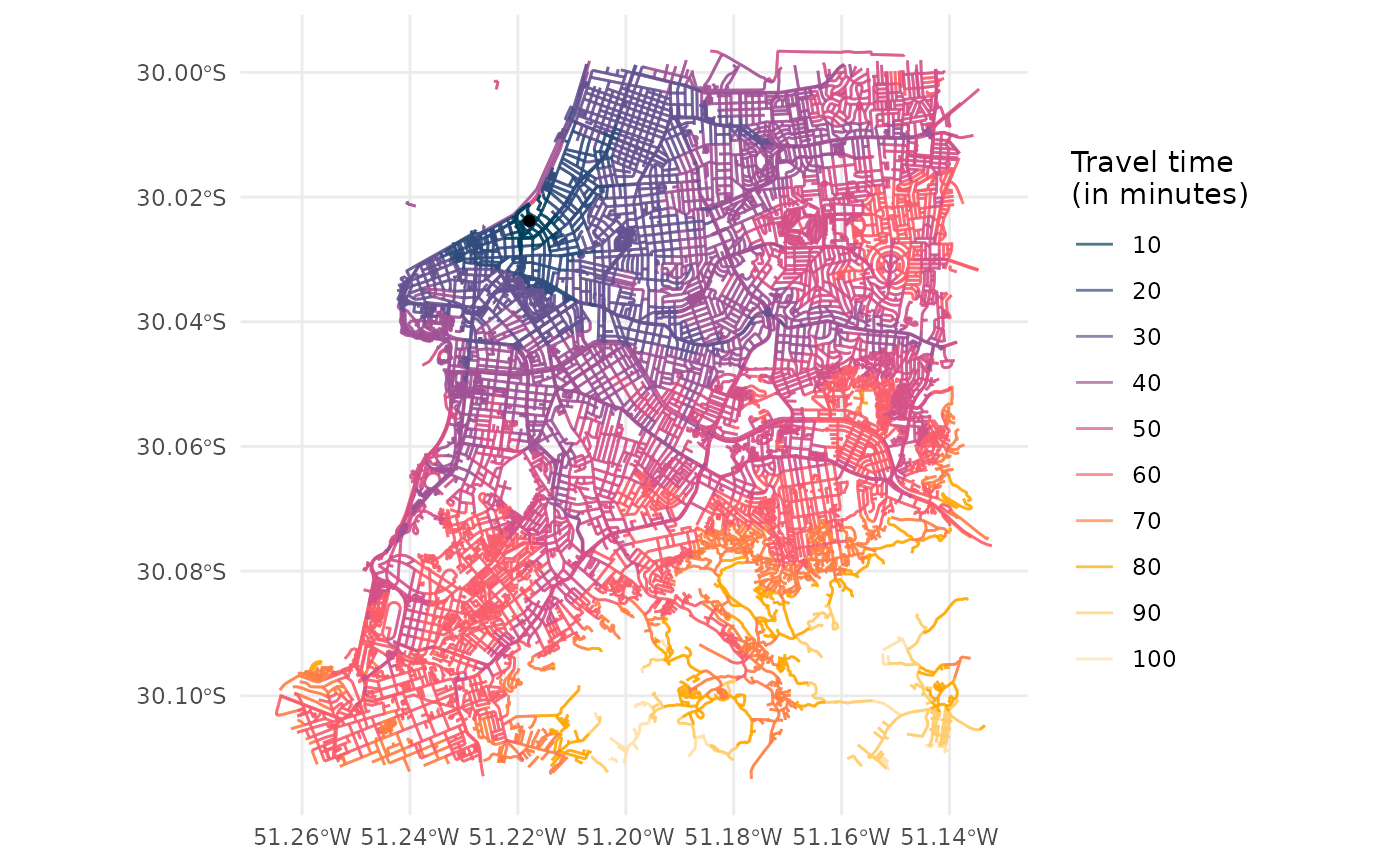
Cleaning up after usage
r5r objects are still allocated to any amount of memory
previously set after they are done with their calculations. In order to
remove an existing r5r object and reallocate the memory it
had been using, we use the stop_r5 function followed by a
call to Java’s garbage collector, as follows:
If you have any suggestions or want to report an error, please visit the package GitHub page.